Two settings that look alike and do the opposite
Most campaigns stand on their own. Sometimes you want them to relate to each other — reward the fan who did the survey and showed up, or hold back the members-only prize until someone has actually checked in once.
The campaign builder gives you two ways to do that, and they sit close enough together to be mixed up:
- Bonus Campaign — a reward. Anyone can join this campaign. Fans who have also taken part in the campaign you point at earn extra points on top.
- Required Campaign — a lock. Fans who haven't taken part in the campaign you point at can see this one but can't join it yet.
One adds points. The other withholds access. Pick the wrong one and you either give away points you meant to gate, or gate a campaign you meant to sweeten.
Bonus Campaign: pay extra for doing both
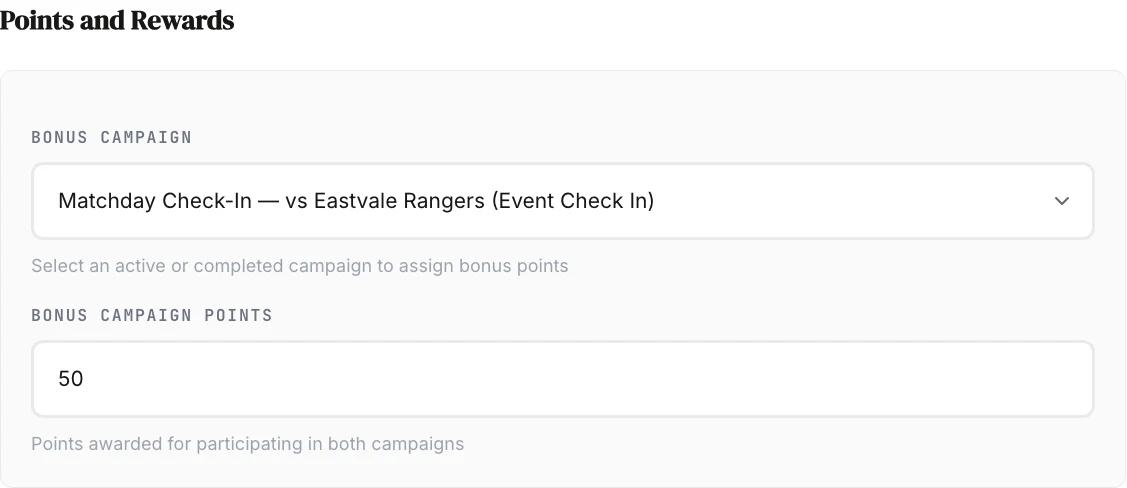
You'll find this in Step 4, Points and Rewards of the campaign builder, under your engagement point fields.
Two fields work together:
- Bonus Campaign — pick any active or completed campaign from your club. The dropdown excludes the campaign you're building.
- Bonus Campaign Points — how many extra points a fan earns for having taken part in both.
The field only appears once you've chosen a campaign, and it becomes required at that point. A bonus campaign with no points attached is an empty promise, so the builder won't let you save one.
Fans see the bonus before they join, but only when it can actually pay them. If a fan has already done the other campaign, the app tells them the extra points are waiting. If they haven't, and that campaign is still open, the app points them at it.
Two details worth knowing. The bonus appears on the campaign's own screen, not on the cards in the browse list — so don't plan a push around "everyone will see the bonus while scrolling." And a bonus never blocks anyone: it's added on top of the campaign's normal points, as a flat amount, not a multiplier.
The trap: a Bonus Campaign can't pay on a prediction or an auction
Prediction and auction campaigns settle their points differently — a prediction pays out when you resolve the correct answer, an auction resolves in points bid rather than points earned. Both settle before the cross-campaign calculation runs, so the extra points from a Bonus Campaign link never reach the fan.
So a Bonus Campaign set on a prediction or an auction will never pay, no matter how it's configured. Game Set Engage won't advertise a reward it can't honour, so fans simply won't see one on those two types. If you set one on a prediction and wonder why nobody's mentioning it, this is why. Put the Bonus Campaign on the check-in or the survey instead, and point it at the prediction.
That doesn't mean a correct prediction goes unrewarded. It earns the campaign's own points — the figure you set in Engagement Points — once for every question the fan got right. That's the prediction's own payout, awarded when you resolve it, and it has nothing to do with the Bonus Campaign field.
Required Campaign: lock this one behind another
You'll find this in the same step, labelled Required Campaign (locks this one). Leave it on "No requirement — open to every fan" and the campaign behaves normally.
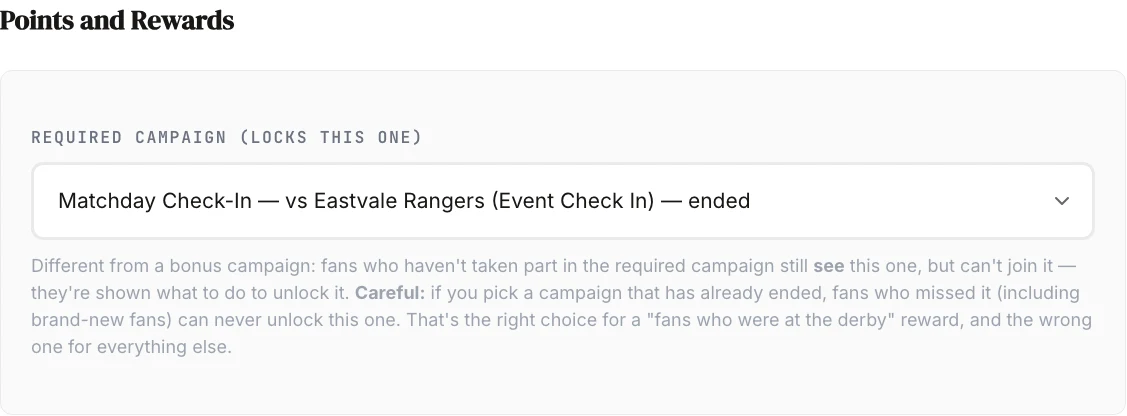
Pick a campaign and three things become true:
- Fans who haven't taken part in it can still see your campaign in the app.
- They can't join it.
- They're told what to do about it.
That visibility is deliberate. A hidden campaign motivates nobody — a fan who can see the reward and knows exactly how to unlock it has a reason to go and check in. Locking is a nudge, not a secret.
Taking part in the required campaign is all it takes. There's no "must have scored points" or "must have won" condition attached — if the fan joined it, the lock opens.
The message the fan reads depends on whether they can still act on it:
- If the required campaign is still running: "Take part in {name} first to unlock this campaign."
- If it has closed: "This campaign was only open to fans who took part in {name}."
That second message is the one to think hard about, because it's a dead end for that fan.
When the prerequisite closes
A lock becomes permanent the moment the required campaign stops being open. Fans who took part keep their access forever. Everyone else — including every fan who joins your club next season — can no longer qualify, because the thing they'd have to do isn't there to do.
Whether that's a problem depends entirely on what you were building. There are two honest answers here, and the guide can't pick for you.
If you're rewarding a cohort, a closed prerequisite is the whole point. Say you ran a check-in at the season's first derby. Months later you're drawn against the same club in the cup, and you want to give that first-match crowd 50% off tickets. Gate the ticket campaign behind that check-in and it does exactly what you mean: nobody can go back and attend that match, and that's what makes the reward worth something. Here the permanent lock isn't a side effect you tolerate, it's the mechanic you're using. Pick the ended campaign deliberately — the builder's warning is written for the other case.
If you're building a funnel, a closed prerequisite breaks it. A welcome offer gated behind an onboarding check-in, a season-long ladder, anything you want new supporters to be able to climb — these only work while the first step is reachable. Here a closed prerequisite is a silent dead end.
So the question to ask before you save isn't "will this stay open?" It's "am I rewarding people who were there, or am I asking people to go and do something?"
Two ways the lock closes, and only the first announces itself:
- You pick a campaign that has already ended. The dropdown offers completed campaigns, marks them — ended, and the builder warns you. Deliberate for a cohort reward; a mistake for a funnel.
- You pick a live campaign and it ends first. Nothing warns you. The prerequisite finishes, gets marked completed, or is archived while your gated campaign is still running.
The second one is worth watching only if you were building a funnel — it converts one into a cohort reward without telling you, and usually not the cohort you meant. The fix is to edit the gated campaign and either clear the requirement or point it at something still open.
What the builder won't let you do
Save-time checks stop you locking yourself into a corner:
- A campaign can't require itself.
- The required campaign must belong to your club — you can't chain across clubs.
- Chains can't loop. A→B→A is rejected, and so is A→B→C→A; the builder walks the whole chain looking for a repeat. A cycle would make every campaign in it permanently unjoinable for everyone.
Longer chains are allowed as long as they run in one direction. Just remember each link narrows the audience: a campaign three steps deep is only open to fans who completed all three.
Note what is not checked: nothing stops you picking a completed campaign. That footgun is guarded by warning copy, not by a validation — the builder assumes you might mean it.
It applies at the venue door too
A locked campaign can't be joined through a partner venue either. Without that, a gated fan could check in at a pub, earn venue points on a campaign they aren't allowed to join, and run up a real bill for the venue in the process.
Which one do you want?
| What you want | Setting | Result |
|---|---|---|
| Reward loyalty across two campaigns | Bonus Campaign | Everyone can join; the fans who did both earn more |
| Drive fans to a campaign that's underperforming | Bonus Campaign, pointed at the quiet one | Extra points give them a reason to go back |
| Make the check-in the price of entry to a prize | Required Campaign | The prize stays visible but locked until they check in |
| Reward a moment that has passed | Required Campaign, pointed at an ended campaign | Permanent, exclusive, and closed to new fans on purpose |
| Link a prediction or auction to another campaign for extra points | Neither — a Bonus Campaign can't pay there | Put the Bonus Campaign on the other campaign, pointed at this one |
A worked example
Say you're running a matchday check-in and want the post-match survey to feel worth doing.
Build the survey as normal. In Points and Rewards, set Bonus Campaign to your matchday check-in and Bonus Campaign Points to 50. Fans who checked in at the ground and then answer the survey collect the survey's points plus 50. Fans who only do the survey still get its points — you've rewarded the double, not punished the single.
Now say you also have a signed-shirt auction you want reserved for people who actually turn up. On the auction, set Required Campaign to the same matchday check-in. Fans who didn't check in see the shirt and see what they need to do about it next time.
Note what you did not do: you didn't put a Bonus Campaign on the auction. It wouldn't have paid.
What's next
- Creating your first campaign — the full builder, step by step
- Campaign types explained — all nine types and when to pick each one
- Managing and publishing campaigns — drafts, going live, and editing
- Campaign analytics and reports — see whether the chain actually moved participation