One place for what needs your attention
As your club gets busier, things start happening that you'll want to know about: a crew member tags you in an event note, or a venue asks to partner with you. The Notifications centre collects all of it in one list so nothing slips past you. This guide explains what shows up there, how to read and clear it, and how the unread badge keeps you in the loop.
To remind you, notifications in your dashboard are for you, the club owner and your crew. They are separate from the push notifications you send to fans, which land on supporters' phones in the mobile app.
What triggers a notification
Your dashboard creates a notification when something involves you directly. The two you'll see most are:
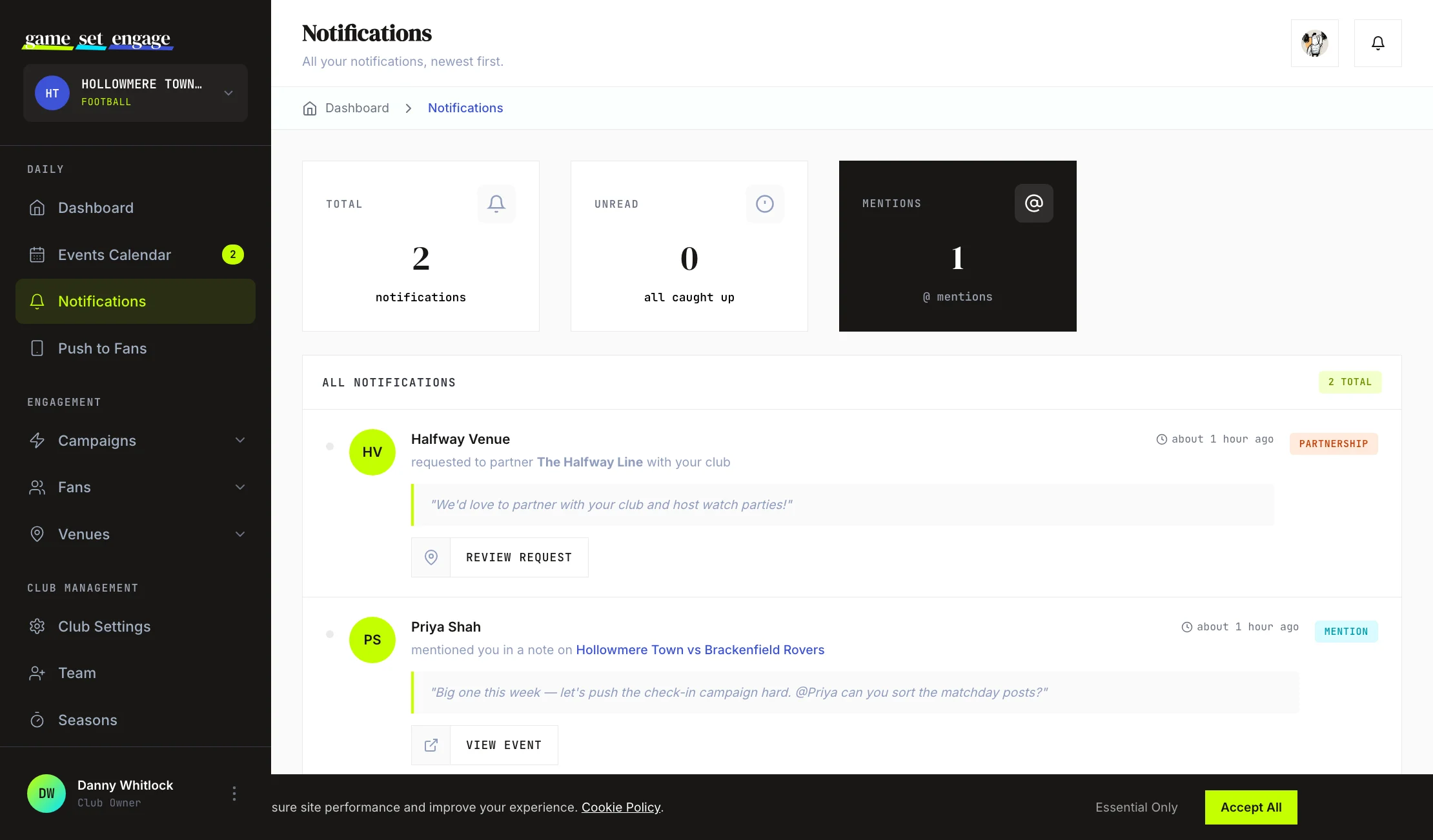
- Mentions — when a crew member @mentions you in a note on an event, you get a notification with a quote of the note and a link to the event. For how mentions are written, see Events calendar and team notes.
- Partnership requests — when a venue asks to partner with your club, you get a notification with the venue's name, their message, and a link to review the request. See Building your venue partner network for what happens next.
Each notification carries the name and avatar of the person or venue behind it, and the time it arrived, so you can see at a glance who did what and when.
Read your notifications
Open Notifications from the sidebar. The list shows every notification, newest first. At the top, three cards summarise where things stand:
- Total — every notification you've received
- Unread — how many still need your attention (or "all caught up" when there are none)
- Mentions — how many of your notifications are @mentions
Each row is tagged so you can tell types apart at a glance: a Mention badge, a Partnership badge, or a general Update. Unread items are marked with a dot so they stand out from ones you've already seen.

Act on a notification
Most notifications come with a button that takes you straight to where you need to go:
- A mention gives you a View Event button that opens the event and its notes
- A partnership request gives you a Review Request button that opens your venue partnerships, where you can accept or decline
This means you can go from "someone needs me" to handling it in a single click, without hunting for the right screen.
How read and unread work
Notifications are designed to clear themselves as you keep up:
- The unread badge. Anywhere in your dashboard, the Notifications link in the sidebar shows a badge with your unread count. Once you pass nine, it shows 9+ to keep things tidy.
- Marking as read. When you open the Notifications centre, everything in the list is marked as read. The unread count resets, and the badge clears on your next page.
- Opening an item. Following a notification through to its event or request also marks that one as read.
So the simple habit is: when the badge appears, open Notifications. Reading the list is what clears it.
Tip: Treat the badge as a to-do counter. A non-zero number means a teammate or a venue is waiting on you. Clearing it keeps your club moving.

Notifications arrive as they happen
You don't have to keep refreshing to find out whether something new has come in. Notifications are delivered in real time, so a fresh mention or partnership request shows up promptly without you reloading the page. Pair that with the unread badge and you've got a reliable signal that something needs you, the moment it does.
What's next
- Events calendar and team notes — where mentions come from
- Building your venue partner network — handle partnership requests
- Push notifications to fans — the messages you send out to supporters
- Inviting and managing your team — add the crew who'll mention you