Why partner venues matter
A venue partner is a local pub, bar, restaurant, or other spot that becomes an official check-in location for your club. When a fan watches a match there and checks in through the Game Set Engage mobile app, they earn points from your club, and the venue gets supporters through the door.
That creates a simple three-way win. Your club reaches fans who aren't at the stadium and gets check-in data from across town. Fans can earn more points than they would watching at home (the club sets the values), plus any offer the venue runs. The venue gets foot traffic on match days. Building a network of these venues turns every fixture into something fans can take part in, wherever they are.
This guide shows you how partnerships work and how to handle the requests that land in your dashboard. If you're the club owner, everything here lives under the Venues menu in your dashboard sidebar. Crew members find the requests under Venue Partners → Partners & Offers.
How a venue becomes your partner
Venues find you, not the other way around. A venue owner signs up on Game Set Engage, and the venue is active as soon as sign-up is finished. There's no Game Set Engage review in between. From there, the venue can ask any club on the platform to partner, and its request lands under Pending Partners in your dashboard.
The decision belongs to your club. You or anyone on your crew can approve or decline a request, and each request is decided once: if a teammate has already answered it, you'll see that it's been decided and by whom. Your approval covers your club only. A venue that another club has approved still has to ask you, and approving it here opens nothing at any other club.
Once you approve a venue, it can join your Event Check-In campaigns and create offers for your fans. Fans only see a venue in the app once at least one club has approved it.
Tip: Every request and every decision is kept, with who made it and when. Open History under a venue on the partnerships screen to see the whole trail, for example a venue that was declined once and asked again.
The All Venues screen
Open Venues → All Venues to see your network at a glance. This screen is for the club owner. The stat cards across the top give you the headline numbers:
- All Venues — how many venues are on the platform
- On My Network — venues your club has approved
- Waiting For Approval — partnership requests waiting for your team's decision
- Total Contribution — what your network has generated so far
Below the stats, the Your Venue Network table lists the venues your club has approved, with each one's category, city, rating, and status. Use the sort buttons to order by newest, name, or rating, or Search to find one by name, address, category, or city. Select any venue name to open its full profile: address, opening hours, owner, partnership stats, and your club's partnership history with that venue.
Reviewing partnership requests
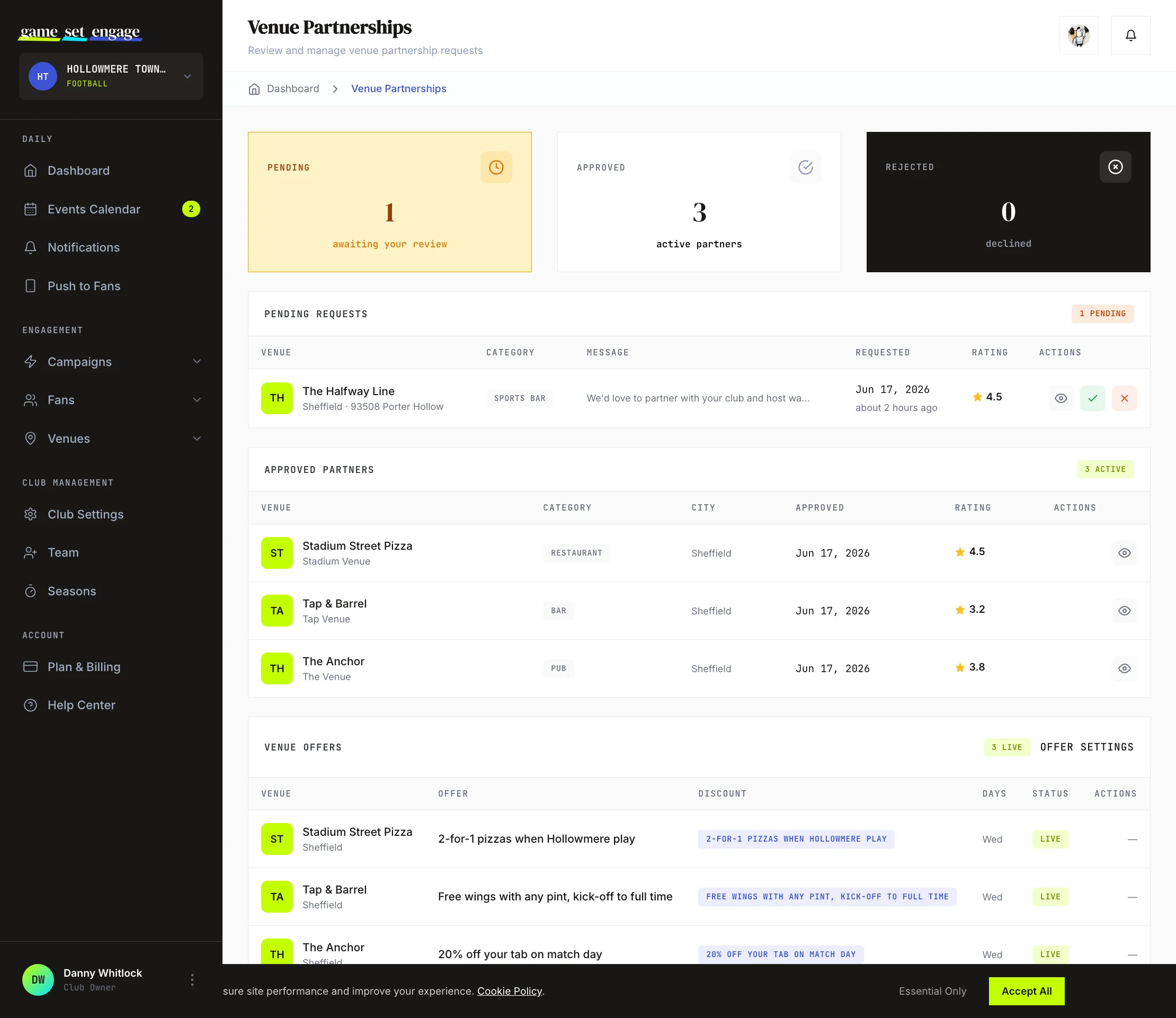
Open Venues → Pending Partners to handle venues asking to join your club's network. This is the Venue Partnerships screen, split into sections: Pending Requests, Approved Partners, Venue Offers, and any Ended Partnerships, Rejected Requests and Blocked Venues.
In the Pending Requests table, each row shows the venue, its category, the message the venue left with its request, when it asked, and its rating. Read the message to understand why the venue wants to partner with you, then:
- View details to open the venue profile
- Approve to add the venue to your approved partners
- Reject to decline the request
Approving and rejecting both ask you to confirm first. Once you approve a request, the venue moves into the Approved Partners list, with the name of whoever approved it, and can join your check-in campaigns. A rejected request moves to Rejected Requests. The venue can ask again later, unless you block it, and a new request comes back to Pending Requests. The number badge next to Pending Partners in the sidebar tells you how many requests are waiting, so you always know when there's something to review.
Ending a partnership
Either side can end a partnership from the dashboard: your club's team, or the venue's owner or a manager. When it ends, the venue leaves your campaigns and its offers for your fans stop. Check-ins it has already confirmed, the fees they booked, and any invoices are not affected. The venue can ask to partner again later, and that request comes to your team like any other. If you'd rather it didn't, block it instead: Ending and blocking venue partnerships covers the difference.
How partner check-ins reward fans
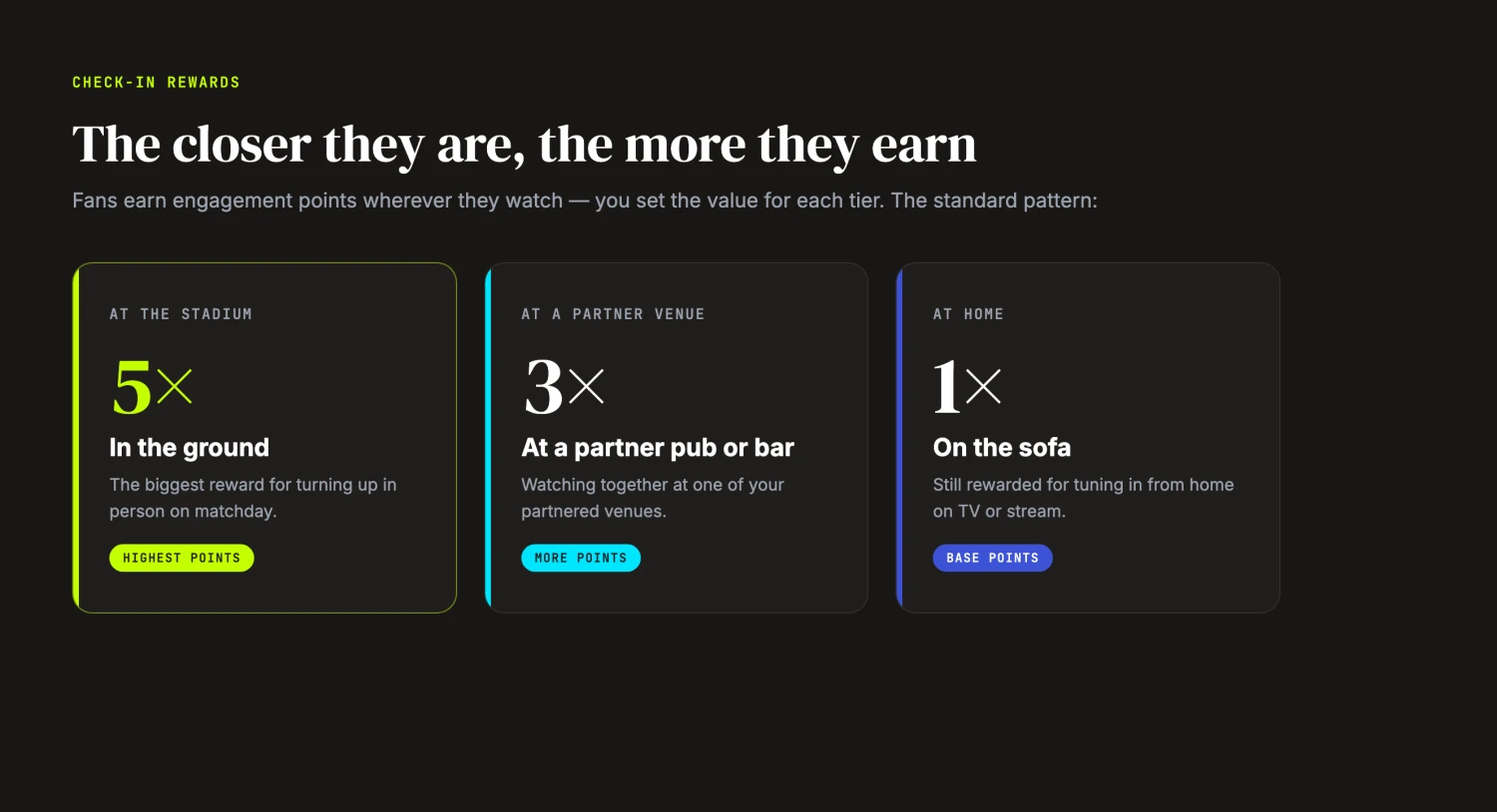
Partner venues exist so fans get rewarded for showing up, wherever they watch. When you build an Event Check-In campaign, you set the points fans earn at each tier. The pattern most clubs use looks like this:
| Where the fan checks in | Points |
|---|---|
| At the stadium or event | 5× |
| At a partner venue | 3× |
| At home | 1× |
These numbers are a recommended pattern, not an automatic calculation. The platform doesn't multiply anything for you. You choose the point values for each tier when you set up the campaign, and the 5 / 3 / 1 pattern is the starting point most clubs reach for because it rewards being there in person while still giving credit to fans watching from the pub or at home.
A partner venue sits in the middle tier on purpose. A fan who walks to a partner pub to watch the match earns more than they would on the sofa at home, which gives them a reason to turn up and gives the venue its foot traffic. For the full walkthrough of building a check-in campaign, see Creating your first campaign.
What partner venues bring beyond match day
Approved partners aren't limited to match-day check-ins. A venue can also run its own routine offers for your fans, such as a midweek discount, and those offers appear in your dashboard alongside the partnership requests. Each partner also sets its own fan incentive, like a discount on the tab when a fan checks in, which gives supporters one more reason to choose a partner venue.
For how the money side works and how to configure those offers, read Venue earnings and offer settings.
What's next
You've got the partnership flow down. From here:
- Venue earnings and offer settings — what you earn from partner check-ins and how to set offer rules
- Approving check-ins at your venue — written for your venue partners; send it to them when they join
- Creating your first campaign — build the Event Check-In campaign that partners host
- Campaign types explained — see how check-ins fit alongside your other options
- Understanding your fans — read the check-in data your network brings in